Astro · New builds & relaunches

Astro web development: fast websites your team actually owns.

Astro web development end to end – content model, design, build, launch and handover. Astro ships static HTML without client-side JavaScript by default; you get a fast site, a repository and accounts that carry your name.

Static by default

Astro renders on the server and ships prerendered HTML. Client-side JavaScript is added only where interaction is genuinely needed.

Content as a data model

Content collections with a Zod schema instead of loose files: your content is validated, typed and queryable through a real API.

No agency lock-in

Repository, hosting account, domain and CMS credentials sit in your accounts. You can keep building without us at any point.

00 — Our Apps

See for yourself what we build.

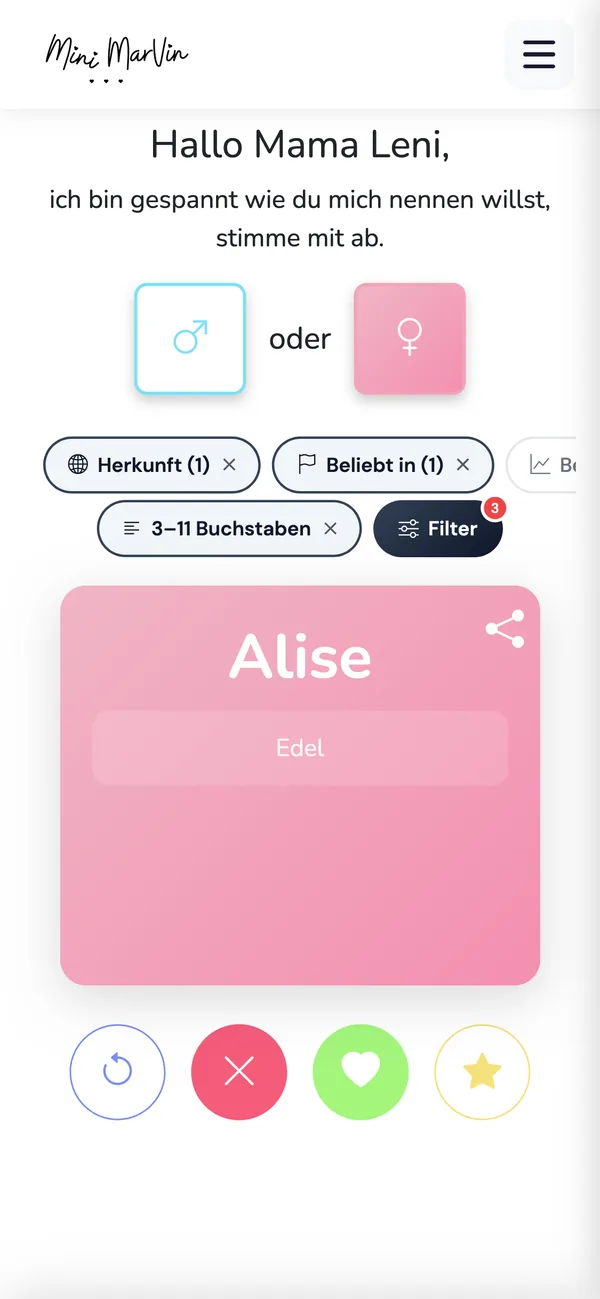
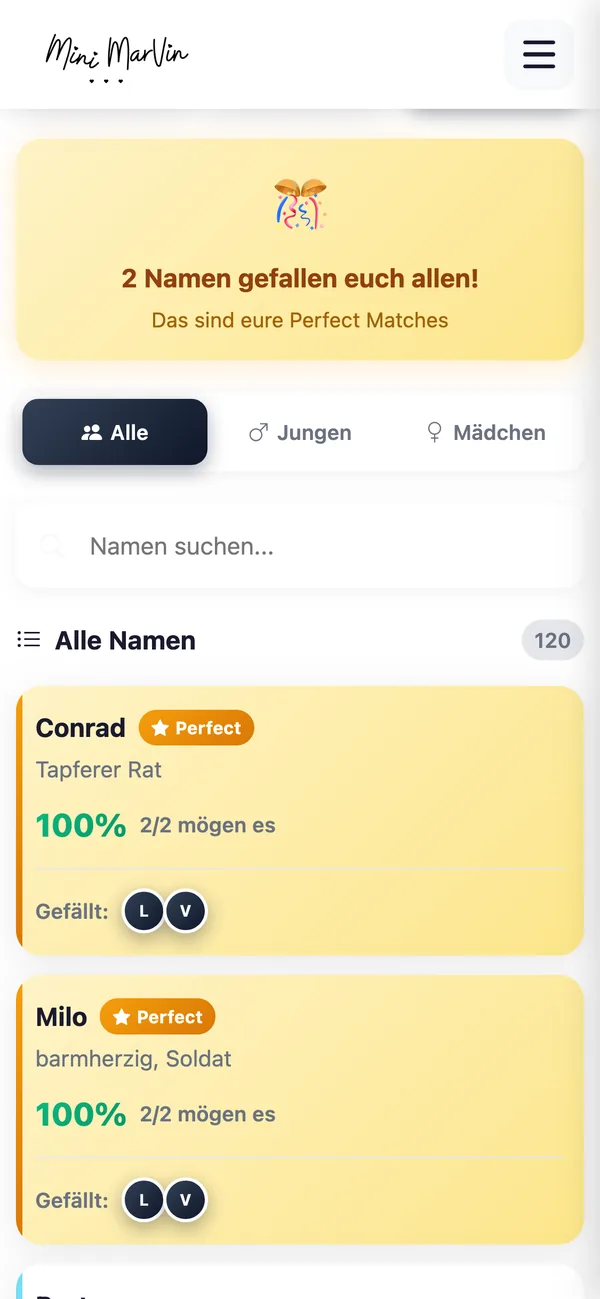
Real screenshots instead of promises: Mini Marvin is our own progressive web app – conceived, built and run live in the browser by us. We bring the same care to your web project.

Mini Marvin · PWA

Swipe baby names instead of scrolling

Mini Marvin is our progressive web app for finding baby names: swipe through 10,000+ first names – right in the browser, no app store needed.

Mini Marvin App – Swipe baby names instead of scrolling Mini Marvin App – Decide together as a couple Mini Marvin App – Filter by origin & popularity

Got a project in mind?

Describe it in three sentences – you get an honest first assessment, usually within 24 hours.

At a glance

What we build

  • New websites and relaunches on Astro – information architecture
  • Content model
  • Design
  • Build
  • Measurement
  • Launch
  • Handover

How it ships

  • Static HTML by default.
  • Individual routes may render on demand, which adds an adapter for your target runtime.

Where the content lives

  • In content collections with a Zod schema – optionally wired to a CMS for Astro if your team actually needs one.

What you own afterwards

  • Everything.
  • Repository, hosting account, CMS credentials.
  • Astro itself is MIT-licensed – there is no platform licence and no dependency on us.

When Astro is the wrong tool

  • Applications with logins, roles and heavy client state.
  • Then we build a real web app – or Webflow, when marketing has to publish without a deploy.

Prefer to talk it through?

A short call clarifies scope, effort and whether we are a fit.

01 — What gets built

What Astro website development actually produces.

"Get a website built" sounds like a single deliverable. In practice it is eight decisions taken before the first commit – and they decide how maintainable the site still is two years later. We make them with you, not for you:

  • Information architecture before the first pixel – We define which page types exist, which of them share a layout, and what the URL structure looks like. In Astro that structure becomes routes and layouts. Changing it later means changing redirects, not just menu items.
  • Content collections as the content model – Posts, references, locations, job ads: anything that recurs with the same shape becomes a content collection – described by Astro as "a set of related, structurally identical data". The schema is defined with Zod, every entry is validated at build time and queried through getCollection(). A typo in the frontmatter then breaks the build, not the live site.
  • The CMS decision – including "no CMS at all" – Astro is CMS-agnostic and works purely as the presentation layer. If two people change a page twice a year, a content management system is overhead: Markdown in the repository is enough. If an editorial team publishes daily, we connect a headless CMS – Storyblok, Sanity, Payload, Directus, Keystatic or WordPress running headless. That decision belongs before the build, not after it.
  • Islands only where interaction is genuinely needed – By default Astro strips all client-side JavaScript out of components. Interactivity is switched on per component: client:load for anything that must respond immediately, client:idle for the non-critical, client:visible for everything below the fold. The configurator gets JavaScript. The paragraph above it does not.
  • Images that do not shift the layout – The built-in image components set alt, loading and decoding and infer dimensions so nothing causes cumulative layout shift; Picture generates multiple formats and sizes with a fallback. Images in the public directory bypass processing entirely, and remote images have to be allow-listed. We decide deliberately what goes through the pipeline and what does not.
  • Deployment target and adapter belong in the plan – Static is the default: the site is prerendered and served as HTML. The moment a route needs on-demand rendering – form handling, personalised areas, preview mode – the target runtime needs an adapter. Official adapters in the @astrojs scope cover Node, Vercel and Cloudflare. Which one you get is decided by your hosting, not by our habit.
  • Analytics and consent from the start – Measurement is planned in rather than retrofitted: consent banner, behaviour before consent is given, cookieless or server-side collection, events on the forms that actually mean revenue. On a page that otherwise ships no client-side JavaScript, every script bolted on afterwards shows up immediately – usually in your Core Web Vitals.
  • Handover with nothing held back – At the end you receive the repository with its full history, hosting and CMS credentials, a README that explains the build, and a walkthrough for your team. None of it stays behind with us.

Stack

Astro 7 is the current major line. Content collections have been available since Astro 2.0, and TypeScript is built in but optional – with the base, strict and strictest presets.

UI frameworks

Astro is framework-agnostic: React, Preact, Svelte, Vue, SolidJS and Alpine.js all have official integrations, and several can be combined – inside a single .astro file.

Beside Astro

Webflow, Flutter, React Native and SwiftUI are part of our stack too. We recommend the right tool, not the favourite one.

Unsure about the stack?

We will tell you when another tool fits your project better.

02 — Process

How your Astro project runs.

Six phases, each with a deliverable you can inspect. No phase starts before the previous one is signed off.

Goals, page types, URLs

What is the site supposed to achieve, for whom, against which conversion goal? That produces the page types and the URL structure. On a relaunch the redirect list is written here already – line by line, old URL to new.

Content model and CMS decision

Which content becomes a collection, what fields each schema needs, who maintains them and how often. Only then is it clear whether a headless CMS joins the stack or Markdown in the repository is the more honest answer.

Design and components

Layouts, typography, grid, states and reusable components – as real pages in a browser rather than static mockups. You see how the site feels on a phone early, not at the end.

Build in Astro

Routes, layouts, collections, image pipeline, forms, integrations, multilingual setup. Interactive components go in deliberately as islands; everything else stays shipped HTML.

Measure before launch

Lighthouse on staging, metadata, sitemap, structured data, an accessibility pass, a redirect test. When we talk about speed we talk about your numbers from your project – not about somebody else's benchmarks.

Launch and handover

Domain, redirects, monitoring and analytics go live, then we watch indexing in Search Console. After that your team takes over – or we stay on for ongoing support. Your call, not the contract's.

Got a project in mind?

Describe it in three sentences – you get an honest first assessment, usually within 24 hours.

03 — Scope

What is included in an Astro build.

New website on Astro

From structure to launch: page types, content model, design, build, measurement. For company sites, product sites and content-driven websites.

Request a project

Relaunch and migration

Rebuilding an existing site on Astro – with content transfer, a redirect concept and an SEO safety net. We describe the route for WordPress, Webflow, Framer and Next.js separately.

See migration routes

Content model & CMS integration

Content collections with a Zod schema, plus a headless CMS where it earns its keep – set up so editors and developers stop blocking each other.

See CMS options

Performance budget & measurement

Images, fonts, third-party scripts and Core Web Vitals kept in view – measured before launch and checked again after it.

See performance work

Integrations & forms

Forms with GDPR-compliant delivery, CRM and newsletter connections, search, multilingual content, custom interfaces. Server-side logic where it belongs.

Request an integration

After launch

Astro follows semantic versioning, and security fixes cover exactly one previous major line. We keep your project inside the maintained line instead of letting it age out.

See support options

Prefer to talk it through?

A short call clarifies scope, effort and whether we are a fit.

04 — Tool choice

Astro, Webflow, or a real web app?

We build all three, which is why we can say honestly when Astro is the wrong answer. This is the matrix we use in the first call:

An assessment from our project practice, not a verdict on any platform. When in doubt, the deciding factor is who maintains the site after launch.
What you wantAstroWebflowCustom web app
Company site, product and landing pages First choice – full control over markup, metadata and delivery Good choice when marketing must publish without a deploy Overkill
Blog, magazine or knowledge base with many posts First choice – content collections are built for large numbers of entries Workable, within the platform's collection limits Rarely justified
Technical documentation and developer content First choice – Markdown, MDX and Markdoc straight from the repository Awkward No
Editors publishing daily, several roles and approvals Astro plus a headless CMS Directly in the platform editor Only with a custom editorial backend
User logins, roles, personalised areas Partly – individual SSR routes and server islands cover edge cases No First choice
Complex business logic, large data volumes, workflows No No First choice
Shop with catalogue, cart and checkout Possible as a storefront in front of a commerce API For small catalogues When pricing and order logic are your own
Marketing wants to assemble layouts itself Within a defined component set First choice No

Thinking about having a website built on Astro?

Describe the project in three sentences: new build or relaunch, rough number of page types, who maintains the content. You get an honest assessment of whether Astro fits – and if it does not, which tool would serve you better.

05 — Timeline

How long does Astro web development take?

Prices are not on this page. Timelines are. The ranges below apply to the six-phase process described above – counted from kickoff to go-live, not from the first email. What gets counted is page types, not pages: whether one template produces twelve location pages or three hundred barely changes the effort.

Four shapes cover almost every new build and almost every relaunch:

  • Focused new build – three to five page types, copy already written: four to six weeks. Home, service page, post or case, contact, legal pages. One language, no CMS, forms and measurement wired up. It only gets shorter when design and copy are already signed off.
  • New build with an editorial operation – six to twelve page types: eight to twelve weeks. A blog or knowledge section, a headless CMS with modelled content types, preview and roles, plus one or two integrations. The largest single item is rarely the code – it is the content model.
  • Relaunch with content carried over, one language: ten to fourteen weeks. On top of the new build come an inventory of every indexed URL, a redirect map written line by line, an import through an export file or a script rather than by hand, and a metadata reconciliation on staging.
  • Relaunch with a large archive, several languages or a system change: fourteen to twenty weeks. Several rounds of sign-off, data transfer out of a legacy system, and a separate editorial and approval track per language. The migration section describes that sequence in detail.

Inside those ranges the time is distributed differently than most people expect. Phases one and two – page types, URL structure, content model – take one to three weeks depending on scope, and they decide everything after them. The build itself is the most predictable part, because new pages come out of a component library in hours. What moves the end date is design sign-off, missing copy, and access credentials that arrive in week six.

Two windows sit behind go-live, and we name them in advance so expectations match reality. Whether a load-time improvement actually lands in the field only shows after four to six weeks, because field data is measured in a rolling 28-day window. After a relaunch we watch indexation and positions for several weeks as well: movement in the first weeks is normal, a permanent loss is a planning failure rather than a side effect.

These ranges are our own experience with our own way of working, not a number borrowed from somewhere. Which point inside the range applies to you is something we say after the first call, together with the assumptions it rests on. What the scope costs is not here but itemised on Astro development cost.

What pulls the range down

Few genuine page types. Content carried over rather than rewritten. One language. A design system that already exists. No CMS – or one whose model is already defined. And one person on your side who is allowed to decide.

What pushes it up

Every additional page type – not every additional page. Copy written during the project instead of before it. Every further language. A content model that has to be invented first. Interfaces to systems we do not control: CRM, ERP, commerce, booking, payments. And approvals travelling through several committees.

The usual reason for delay

Not the technology: content and sign-off. When copy, images and access are ready and feedback returns within a few working days, the plan holds. When it does not, the date moves – and we say so early instead of waiting quietly. Where coordination spans several departments, we can take on project management as well.

Unsure about the stack?

We will tell you when another tool fits your project better.

06 — At a glance

Astro web development at a glance.

Eight points that genuinely come up when a website project goes out to tender: answered short, each with its caveat beside it. The last row is our opinion, not a summary.

CriterionHow it looks with AstroThe caveat
What you get at the end A repository with full history, a component library, a content model with a Zod schema, the image and form pipeline, a README explaining the build, and a walkthrough for editors and developers – all in your accounts. The scope is tied to the page types you agreed. An additional page type is a commission, not a quick favour in between – even though it then takes hours rather than weeks to produce.
Delivery model By default the entire site is prerendered and served as static HTML. Client-side JavaScript is added only where a component asks for it through a client:* directive. Speed is not automatic because of that. One heavy island hydrated immediately on every page gives the advantage back. That is why we agree a performance budget instead of trusting the architecture.
Editing after launch Three combinable routes: Markdown with content collections, a headless CMS with an interface, preview and permissions, or editing by chat into the same validated model. No visual page builder. If your team wants to assemble layouts freely by drag and drop, Webflow is the more honest answer – and we offer that ourselves.
Design & brand An existing design system, Figma library or brand guideline becomes a component library in code, including tokens for colour, typography, spacing and states. Without a template, we design. A translation is not a copy. Effects that only work inside a design tool cost load time or usability – we propose an alternative rather than changing it quietly. Without a template the design phase grows.
Existing content in a relaunch Content is carried over structurally: inventory, mapping onto collections and fields, import through an export file or script instead of copy-paste, a redirect map line by line, metadata reconciled on staging. Anything that exists in the old system only as a freely assembled page has no field model and has to be restructured. And ranking stability is something we plan for – it cannot be guaranteed.
Review & staging Every state of work gets its own preview URL out of continuous integration: real environment, real content, real behaviour on a phone. Type checking and the build run before every sign-off. Preview environments are meant for your team, not for search engines: they are locked and not indexed. Sharing one publicly needs a deliberate exception.
Hosting & operations The static build runs on any CDN or static host, including a provider inside Germany or the EU. On-demand rendering is switched on per route through an adapter for the target runtime. As soon as routes render at request time you need a runtime: running cost, one more part in monitoring, and a component that can fail.
Ownership & handover Repository, hosting account, domain and CMS credentials sit in your name; Astro is MIT-licensed. Any team working with JavaScript and Git can take over – including without us. Control means responsibility. Without someone in-house who touches deployments, or a maintenance agreement, a self-run stack ages faster than a managed platform.
Our take For a company website whose business depends on content and discoverability, a new build on Astro is currently our default recommendation. The most expensive mistake in this category – an application framework carrying a brochure site – simply cannot happen here architecturally, and operations stay boring afterwards. We advise against it when your marketing team wants to assemble new pages freely and nobody in-house will ever trigger a deployment. Then we propose Webflow – we build that too – or we build Astro and you budget the support alongside it. Without one of the two, the fast site becomes the outdated site within two years.

Got a project in mind?

Describe it in three sentences – you get an honest first assessment, usually within 24 hours.

07 — FAQ

Frequently asked questions about Astro web development.

What is Astro, and why do you build with it?

Astro is an open-source, MIT-licensed web framework for content-driven websites. It renders on the server, ships static HTML by default and removes client-side JavaScript from components until you explicitly ask for it. For marketing sites, magazines and documentation that model simply fits better than a single-page application. We go into more depth on What is Astro?.

What does Astro web development cost?

Three things set the range: the number of distinct page types (not pages), the depth of the content model including any CMS, and the scope of integrations. A focused company site sits well below a relaunch with an editorial system, multiple languages and interfaces. After the first call you get a transparent estimate with its assumptions written down. The cost drivers in detail are on Astro development cost.

What do you need from us for the schedule to hold?

Four things, and none of them is technical. One person who is allowed to decide, rather than a committee that reopens every round. Content in the state it is meant to appear in – or a clear instruction that we write it. Access to domain, hosting, analytics and the legacy system at the start, not in week six. And feedback within a few working days. Where coordination spans several departments, we can take on project management as well.

Do we even need a CMS for an Astro website?

Not necessarily. Astro is CMS-agnostic: content can live as Markdown, MDX, JSON or YAML files in the repository and be queried through content collections. A headless CMS pays off when several people publish without developer tooling, when approvals are needed, or when content is reused across channels. Below that threshold it is extra cost and one more system to operate. We settle this with you before anything is built.

Can we maintain content afterwards without a developer?

Yes, if it is set up that way – and we set it up that way. With a CMS your team edits in forms and saving triggers a build. Without a CMS you edit Markdown files directly in your repository interface, and the Zod schema flags missing fields before anything goes live. Structural changes – a new page type, a new component – remain development work. On request we can also let you edit the site by chat.

Our marketing team wants to publish campaign pages without waiting for the next sprint. Is that possible?

Yes, within what we define up front. We build a set of approved sections – hero, text block, image sequence, quote, form, FAQ – that your team assembles into new pages in the CMS, metadata and preview included. A new building block or a new page type stays development work. If marketing wants completely free layout control instead, Webflow is the more honest tool – we build that as well, and we would rather say so before the project than after it.

We already have a design system and brand guidelines. Do you build on those or start over?

We build on them. Your tokens for colour, typography, spacing and states become a component library in code, and a maintained Figma library measurably shortens the design phase. What we raise rather than change quietly: effects that only work inside a design tool – heavy animation, large image areas, many type weights – cost load time or usability. In those cases we propose an implementation that stays on brand and still measures well. Without existing templates we design, and the design phase grows accordingly.

What happens to our existing content?

It is carried over structurally, not copied. First an inventory: which pages exist, what traffic and inbound links they have, what can go. Then the mapping onto collections and fields – title, date, author, image, category. Then the import through an export file or a script, images and metadata included. Content that exists in the old system only as a freely assembled page has no field model and has to be restructured. Anything we think you can drop, we say so – and still redirect the old URL properly.

Do we see the site before launch, and how do staging and sign-off work?

Yes, and early. Every state of work sits on its own preview URL produced by continuous integration: real environment, real content, real behaviour on a phone rather than screenshots. You comment there, we work it in, and every change produces a new preview. Before sign-off we run type checking, the build, Lighthouse and a pass over metadata, redirects and accessibility. Preview environments are meant for your team: they are locked and not indexed.

Which browsers and devices does an Astro website support?

As a default target, the two most recent versions of Chrome, Safari, Firefox and Edge on desktop, tablet and phone; if your own usage data says otherwise we move the target and record it in writing. There is a structural advantage on top: because an Astro page is shipped HTML at its core, it stays readable where JavaScript fails or is blocked. Old browsers such as Internet Explorer are no longer a target. Where a corporate intranet still runs one, we price that in before the proposal.

Do I own the website afterwards?

Yes, completely. The repository sits in your organisation, the hosting account and domain are in your name, the CMS credentials are yours. Astro is MIT-licensed, so there is no platform licence and no licence from us. Any other agency can take the project over without rebuilding anything. We prefer to convince through work rather than lock-in.

Can we develop the site further in-house later on?

Yes, if someone on the team works with HTML, CSS, JavaScript and Git. You receive the repository with its full history, documented build and deployment steps, a component library small enough to hold in your head, and a walkthrough. On hiring, honestly: fewer CVs carry "Astro" than carry "WordPress". The effort stays small anyway, because Astro components are HTML, CSS and TypeScript and interactive islands are written in React, Preact, Svelte, Vue, SolidJS or Alpine.js – you hire from the general JavaScript market. On request we pair with your team for the first weeks.

What happens if you are unavailable, or if we part ways?

You keep everything that makes up the project. The repository is yours from the first week, hosting and CMS credentials are in your name, the domain anyway. There is no licence, no building block and no editor tied to us – Astro is open source under the MIT license. The repository contains a README explaining build, deployment and content model. Any team working with JavaScript and Git can take over. Switching is never pleasant, but it is not a rebuild.

Who is liable if something breaks after launch?

We are. Whatever we built that does not work as agreed, we fix under statutory warranty without a new invoice. That is separate from a change request: a new page type or a new feature is a commission, not a defect – and which of the two categories a report falls into is something we state before we start, not afterwards. Fixed response and recovery times can be agreed in writing if your procurement needs them; they belong in the maintenance agreement.

Our IT security team is asking about the attack surface. What do we tell them?

That the classic attack surface of a content website largely disappears here. A prerendered Astro site has no database, no admin login and no plugin ecosystem in the delivery path – the usual route through a vulnerable extension simply does not exist. What remains and genuinely deserves review: permissions on the repository and build pipeline, the provenance of npm dependencies, form and API endpoints, a headless CMS as a separate system with its own login, and the domain and hosting accounts. We work with mandatory two-factor authentication, least privilege and regular dependency updates, and we document where secrets live.

What about GDPR, hosting location and subprocessors?

Astro is a framework and processes no personal data itself – the question is decided by hosting, forms, analytics and CMS. A static build can run with a provider inside Germany or the EU. We self-host fonts instead of loading them from third-party servers, analytics has cookieless options, and the form endpoint is chosen deliberately rather than shipped with the tool. We name every service provider involved so your data protection officer can put the processing agreements in place. What that means in practice is on GDPR-compliant websites. We do not give legal advice.

We have accessibility obligations. Does an Astro build cover them?

No framework makes a website accessible. That comes from markup, contrast, focus order, forms and keyboard operation. Astro helps structurally in one place: it ships server-rendered HTML that is readable without executing JavaScript, and the built-in image component sets the alt attribute, loading behaviour and dimensions. Everything else we treat as a requirement inside the project rather than as rework – details on accessible websites. We do not issue a legally binding conformance statement; we deliver a state your own audit can assess.

Will we lose rankings in the relaunch?

Not if the move is planned. We pull every indexed URL beforehand, turn it into a complete 301 list, keep the title and heading structure of the load-bearing pages stable, and test the redirects before go-live. After launch we watch indexing and rankings for several weeks and correct what drifts. The individual routes are described under Astro migration.

You have no public Astro reference yet. Why should we trust you with the build?

Because we would rather say that than invent one. We do not have a publicly showable Astro client project so far. What we do have: a Webflow reference we built and maintain, our own products that we developed and shipped ourselves, and years of software development with repositories, continuous integration and operations. The framework is the smaller part of that work. Checking us is cheap: the first assessment costs nothing, the repository is yours from day one, and measurement happens before and after launch inside your own project.

When is Astro the wrong choice?

When you need an application rather than a website: user logins, roles and permissions, complex business logic, heavy client state. For that we build a custom web application. And if your marketing team wants to assemble new pages itself without ever seeing a repository, Webflow is honestly the better tool. We build both – so we do not need to sell you Astro.

Is Astro free?

Yes. Astro is open-source software under the MIT license; there is no licence fee for the framework itself. Cost comes from design, build, content, hosting and operations – and, if you use one, from the headless CMS.

Does an Astro website need a server?

Not necessarily. By default the whole site is prerendered, static HTML pages go to the browser, and that runs on any CDN or static host. Only when individual routes need to render at request time does an adapter for the target runtime join in – officially maintained ones include Node, Vercel and Cloudflare.

Is Astro good for SEO?

The technical foundation is good: every page is prerendered by default, so search engines receive finished HTML and do not need to execute JavaScript. Rankings do not follow from that alone – they come from content, structure and links. Where it stalls, an SEO audit finds it.

Can you use React components in Astro?

Yes. There are official integrations for React, Preact, Svelte, Vue, SolidJS and Alpine.js, and several of them may appear on the same page – though only inside a single .astro file. Existing components can often be carried over rather than rewritten.

Ready for a website that ships as HTML?

Tell us briefly what you have in mind – you get an honest assessment of scope, content model and cost range. Usually within 24 hours.

— Contact

Request an Astro project.

New build or relaunch, rough scope, who maintains the content – three sentences are enough for a first assessment.

Call now +49 155 63582204 Message on WhatsApp Write an email

We usually reply within 24 hours.
Remote & on site – working across the DACH region (DE, AT, CH), with international project experience.

What is it about?
Timeframe (optional)

Your details are only used to process this inquiry – no newsletters, no sharing.