Astro · CMS & editorial workflow

Astro CMS: choosing the right headless CMS for Astro.

The best Astro CMS depends on who edits your content and how: we compare content collections, git-based CMSs, API-based headless systems and headless WordPress – and if you want, we build it.

Your editors decide

The CMS choice follows from the team, not from the framework. A team publishing daily needs something different from a team that changes a page four times a year.

No CMS is a valid answer

Astro reads content from the repository in a type-safe way. For developer-maintained sites that is often the cheaper, sturdier and faster option – and we say so.

Stay switchable

We wrap CMS access in a data layer of its own. Changing vendors then hits that layer – not every single page.

00 — Our Apps

See for yourself what we build.

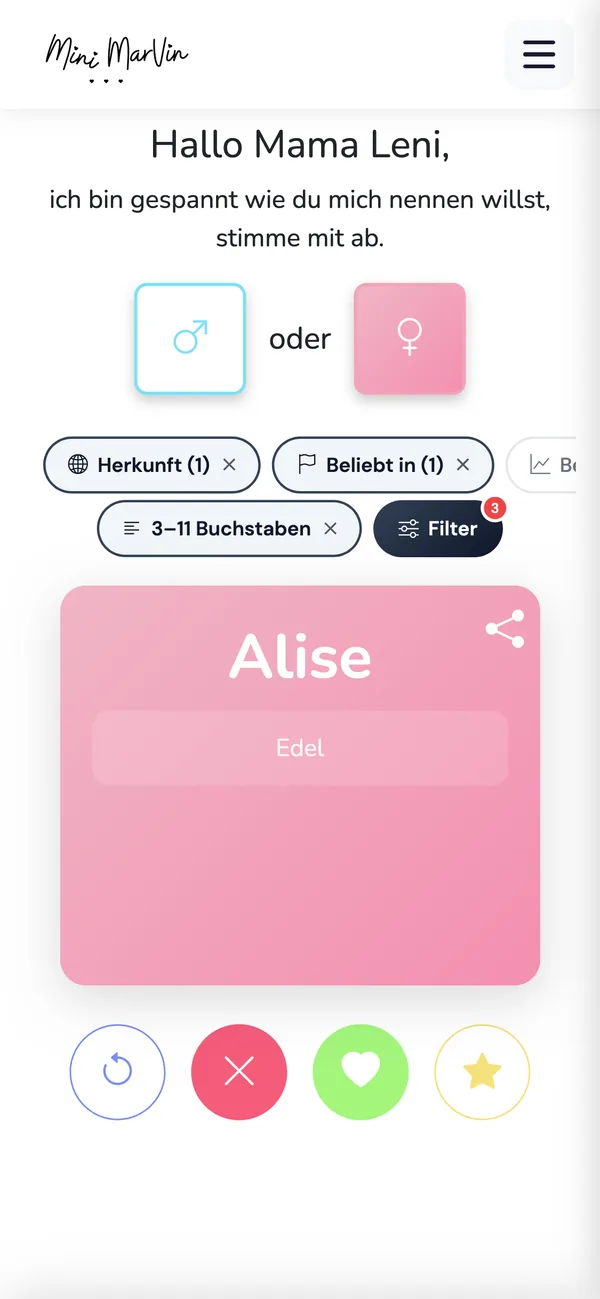
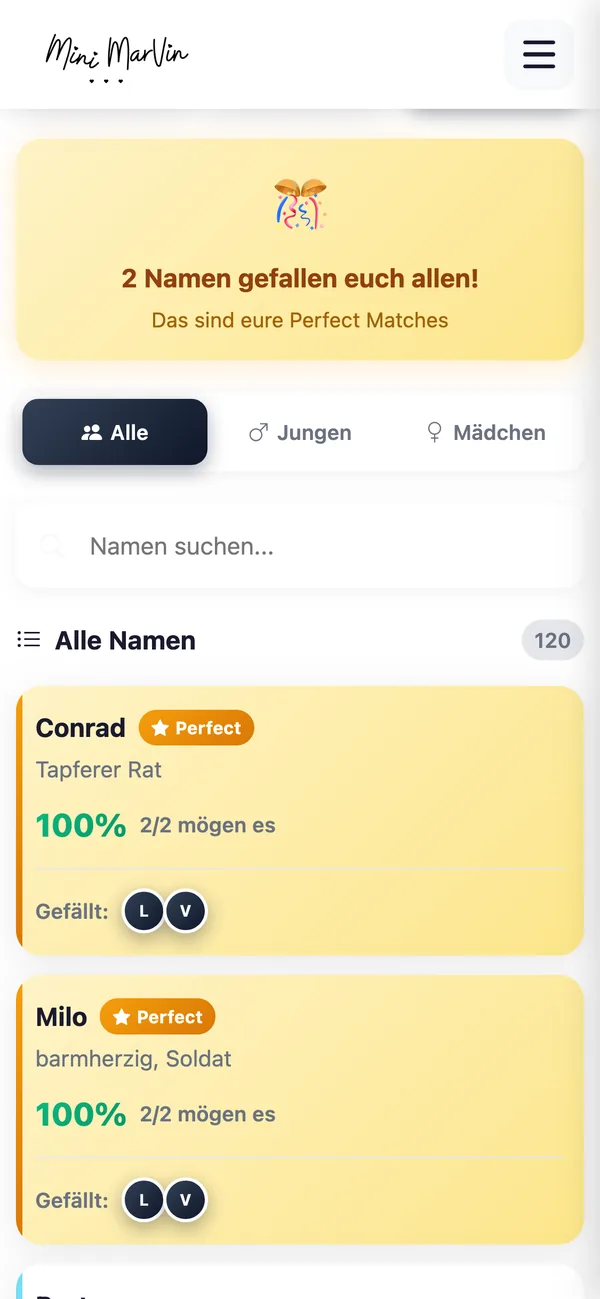
Real screenshots instead of promises: Mini Marvin is our own progressive web app – conceived, built and run live in the browser by us. We bring the same care to your web project.

Mini Marvin · PWA

Swipe baby names instead of scrolling

Mini Marvin is our progressive web app for finding baby names: swipe through 10,000+ first names – right in the browser, no app store needed.

Mini Marvin App – Swipe baby names instead of scrolling Mini Marvin App – Decide together as a couple Mini Marvin App – Filter by origin & popularity

Got a project in mind?

Describe it in three sentences – you get an honest first assessment, usually within 24 hours.

At a glance

Astro does not need a CMS.

  • Content can live in the project as Markdown, MDX, Markdoc, JSON, YAML or TOML and be queried type-safely through content collections.
  • For sites that developers maintain, that is the simplest and most stable option.

Git-based CMSs

  • Such as Decap, Keystatic and TinaCMS put an editing UI on top of exactly those files.
  • Content stays in the repository, there is no second database – a good fit for small editorial teams.

API-based headless CMSs

  • Such as Storyblok, Sanity, Contentful, Hygraph, Prismic or DatoCMS separate content from presentation completely.
  • Worth it as soon as multiple editors, approvals, translations or several output channels are involved.

Self-hosted systems

  • Like Strapi, Payload CMS or Directus are the same idea on your own infrastructure: more control over the data, more operational work in return.

WordPress remains an option.

  • Run headless, it only serves content through its API while Astro builds the front end.
  • Your editors keep wp-admin – see WordPress as a headless CMS.

If content must be correct at request time

  • – prices, stock levels, availability – live collections are the answer: src/live.config.ts plus getLiveCollection() fetch data per request instead of rebuilding on every change.

Prefer to talk it through?

A short call clarifies scope, effort and whether we are a fit.

01 — Content collections

Before you buy a CMS: check whether you need one.

Astro ships its own way of managing content. Skipping it and buying a system straight away usually means paying for features nobody uses.

Astro describes itself as a web framework for content-driven websites, and it backs that up: content management is part of the framework itself. Content collections arrived in Astro 2.0. A collection is, in the words of the documentation, "a set of related, structurally identical data" – a group of entries that share a shape. All blog posts. All job openings. All locations, all product pages, all case studies. The entries live in the project as files: Markdown, MDX, Markdoc, JSON, YAML or TOML.

What content collections actually give you

The documentation lists three benefits: type safety, content-focused query APIs, and built-in caching that holds up across thousands of entries. In practice that looks like this:

  • Schema validation with Zod. In src/content.config.ts you declare which fields an entry must have and what type they are. Astro validates every single file in a collection against that schema and derives TypeScript types from it automatically. A missing date or a mistyped field name breaks the build instead of quietly producing a half-empty page. The schema is optional but recommended – we always write one.
  • Two built-in loaders. glob() reads a whole directory and turns every file into an entry. file() produces multiple entries from a single file, which is handy for data sets maintained as one JSON or YAML list: locations, pricing tiers, team members.
  • A query API instead of file plumbing. getCollection() returns a whole collection, getEntry() a single item – filtered, sorted and typed. Nobody has to walk directories or hand-parse frontmatter.

When that is already enough

If your content is maintained by developers or technical writers who work in Git anyway, you do not need a CMS. The pull request is the approval process: someone writes, someone else reviews, then it ships. No subscription, no second login, no API that can go down, no content model that has to be kept in sync across two systems.

We are blunt about this because it is the cheapest option – and because a CMS nobody uses is pure running cost. There is a middle road for small teams, too: keep content in the repository, but make changes through a chat interface rather than an editor. In plenty of cases that replaces a system you would otherwise pay for monthly.

When content has to be fresh at request time

Content collections are read at build time. For editorial content that is exactly right: the output is static HTML served without a database query. For data that changes between two deployments – prices, availability, appointments, stock – there are live collections: configured in src/live.config.ts and queried through getLiveCollection() and getLiveEntry(). Those values are fetched when the request comes in rather than when the site is built.

That requires a server runtime, meaning a route with export const prerender = false and an adapter for your target environment. So we mix deliberately: the bulk of the site stays static and fast, and only the genuinely volatile parts are fetched live. What that does to load times is covered on Astro performance optimization.

Astro is CMS-agnostic

The documentation draws the line clearly: a CMS helps you write your content, but does not generate the site that displays it. Generating that site is Astro's job.

Build time or request time

src/content.config.ts with getCollection() reads at build time. src/live.config.ts with getLiveCollection() reads per request. Both can live in the same project.

Documented integrations

Astro maintains its own CMS guides – among others for Storyblok, Sanity, Contentful, Strapi, Payload CMS, Directus, Hygraph, Prismic, DatoCMS, Ghost, Decap, Keystatic, TinaCMS and headless WordPress.

Unsure about the stack?

We will tell you when another tool fits your project better.

02 — The families

Five ways to get content into an Astro site.

These systems differ less in what they can do than in who owns them and who operates them. Read the last column first.

Astro is the same presentation layer in all five cases. What changes is where the data comes from – and who maintains it.
FamilyEditing experienceOperationsCost shapeFits you when …
Content collections
no CMS
Content as files in the repository, edited by commit or pull request. No editor, no UI. Nothing extra to run – the content lives in the project. No licence, development time only. Developers or technical writers maintain the content and already work in the repository.
Git-based CMS
Decap, Keystatic, TinaCMS
Browser editor with real fields and preview; saves back into the repository. Deployable alongside the site, sometimes with a separate auth service. Open source; costs come mainly from authentication and hosting. One to five editors publish occasionally and the content should stay versioned in Git.
API-based headless CMS
Storyblok, Sanity, Contentful, Hygraph
Visual editors, draft preview, roles, approvals, localisation, reusable blocks. Runs as a service at the vendor; Astro fetches content over the API. Subscription that scales with seats, environments and traffic. Marketing publishes regularly, with approval stages, several languages or several channels.
Self-hosted headless CMS
Strapi, Payload CMS, Directus
Your own admin UI, modelled freely – up to data that goes beyond editorial content. Your own server or container plus a database, updates and backups included. No licence fee, but ongoing operations and maintenance. Data has to stay in house, or the content model is closer to an application than to editorial.
Headless WordPress Familiar wp-admin and Gutenberg; existing roles and editorial habits stay intact. The existing WordPress instance keeps running – just without its theme front end. Hosting as before, plus the Astro front end. Your team knows WordPress and wants to keep it, but needs a faster, decoupled front end.
Live collections
an addition, not a CMS
Depends on the source system – changes are visible without a new build. Needs a server runtime and therefore an adapter. Runtime cost instead of build time. Prices, stock or appointments must be correct at the moment the page is requested.

Got a project in mind?

Describe it in three sentences – you get an honest first assessment, usually within 24 hours.

03 — The decision

Do you need a CMS for Astro – or not?

For roughly half the enquiries we get, the honest answer is no. Read both columns and count where more points apply to you.

You need a CMS when …

These signals argue for an editorial system, whichever family it ends up being.

  • Content is maintained by people without Git access: marketing, sales, product, HR.
  • There is a real approval process – one person writes, another approves and publishes.
  • The site ships in several languages and translations must be maintained and tracked side by side.
  • Content is reused across channels: website, newsletter, app, partner portal, trade-show screen.
  • You publish often – several times a week, usually under time pressure, sometimes on a Friday afternoon.
  • Editors need a draft preview before anything goes live.
  • Images and documents are uploaded by non-developers and should be delivered in the right formats automatically.

You do not need one when …

Then content collections are the more honest answer. And considerably the cheaper one.

  • Content is maintained by developers or technical writers who work in the repository anyway.
  • It changes rarely: a handful of pages, a few posts per quarter.
  • The pull request is the approval process – review, comment, merge, done.
  • The site has one language and a clearly bounded scope.
  • You want no extra dependency and no monthly licence for features you will not use.
  • Content and code should stay versioned together and deployable together.
  • The real need is "I want to change a paragraph quickly" – which we also solve by chat.

Prefer to talk it through?

A short call clarifies scope, effort and whether we are a fit.

04 — Process

How we set up your CMS with Astro.

Six steps, in this order. Picking the tool sits deliberately at position three, not position one.

Map the editorial reality

Who maintains what, how often, with which approval? We talk to the people who will work in the system every day first – not to a vendor's feature list.

Design the content model

Which content types exist, which fields are required, what is reusable, what is a page and what is a block? The model comes before the tool, so that it survives a later change of system.

Select a system – and justify it

We put two or three suitable options side by side with their cost picture and recommend one, including the arguments against it. The budget frame is on Astro development cost.

Integrate and encapsulate

CMS access lives in a data layer of its own: content collections with a Zod schema for everything known at build time, live collections where freshness matters. Changing vendors then hits that layer instead of every page.

Preview, roles, deploy hook

Draft preview, role permissions and the webhook that triggers a build after publishing. This is exactly where CMS projects fail in practice, so we test it before launch rather than after.

Hand over to the editors

A short walkthrough, a documented content model, all credentials in your ownership. After that we take over ongoing support and maintenance – or your team carries on alone.

Not sure which CMS fits your team?

Describe in three sentences who maintains content at your company and how often. You get a recommendation with reasoning – including when the recommendation is "none at all".

05 — Timeline

How long does an Astro CMS setup take?

Prices are not on this page; timelines are. The ranges below apply to the six-step process above – counted from kickoff to the day your editors publish on their own, not from the first email.

Four shapes cover almost every CMS enquiry we get:

  • The decision only: one to two weeks. Steps one to three as a package of their own – map the editorial reality, sketch the content model, put two or three systems side by side with their cost picture. The result is a reasoned recommendation you could take to another agency. Teams that run this round first usually save themselves the more expensive one afterwards.
  • Content collections, no CMS: one to two weeks. Schema in src/content.config.ts, loaders, queries, sample content and a short walkthrough of the repository. The assumption: the Astro project already exists and the content types are settled. If the site itself still has to be built, the frame is the one on Astro web development.
  • A git-based CMS on an existing project: two to four weeks. On top of the above: editor configuration per content type, authentication, preview through branches and your host's deploy previews, and handover to one to five editors.
  • An API-based headless CMS with roles, approvals and preview: five to nine weeks. A content model with reusable blocks, permissions, a server-rendered preview route, the deploy webhook and training for your editors. Localisation or a second output channel pushes this to the upper end.
  • Moving an existing editorial team, content included: eight to fourteen weeks. An inventory of the old model, a field-by-field mapping, a repeatable import script, the media library, redirects and parallel operation until sign-off. The whole move is described on WordPress to Astro and WordPress as a headless CMS.

What moves those ranges is rarely the code. It is the number of genuine content types – not the number of pages – whether content is migrated or written from scratch, every additional language, every integration with a third-party system, and how many approval stages have to be modelled. Two content types with eight fields each are modelled in a day; twelve types that reference each other are a work package.

The usual reason for delay is still something else: content and sign-off. A content model cannot be finished while it is still open which fields a page should have – and that question is answered by your editors, not by us. With API-based systems, vendor review by procurement and data protection comes on top; depending on the organisation that takes a week or two months. We plan both in visibly instead of booking them later as a surprise. Where approvals run across several departments, we take on project management as well, if you want us to.

We do not put a price figure here – we put the drivers, written out on Astro development cost. The estimate for your project follows the first conversation, together with the assumptions it rests on.

What pulls the range down

Few, clearly bounded content types. Content that is migrated rather than rewritten. One language. A team that already knows who publishes and who approves. And the willingness to start with the smallest system that carries the daily work.

What pushes it up

Every additional content type and every reference between types. Every further language plus its translation workflow. Multi-stage approvals. Integrations with CRM, PIM, ERP or a shop. A large legacy media library. And a vendor review by procurement and data protection.

What we will not do

We do not name a number of weeks before we have counted your content types. And we do not set up a system whose preview and approval path we have not tested first – that is where CMS projects fail, not at the integration.

Unsure about the stack?

We will tell you when another tool fits your project better.

06 — At a glance

The Astro CMS decision at a glance.

Eight criteria that actually come up in selection meetings – answered briefly, each with its own caveat next to it. The last row is our opinion, not a summary.

Compact overview: maintaining content on an Astro site – content collections, git-based CMSs, API-based headless CMSs and headless WordPress.
CriterionHow it looks with AstroThe caveat
Who maintains content Your choice, because Astro is CMS-agnostic: developers through content collections in the repository, one to five editors through a git-based CMS, larger teams through an API-based system with roles – or by chat, through an agent that writes into the same validated model. The choice is made once and shapes daily work for years. Picking by feature list rather than by editorial reality means paying for role models nobody ever uses.
Preview & approval API-based systems expose drafts through a dedicated preview token; for that we build a server-rendered preview route. Git-based CMSs use branches and your host's deploy previews instead. Preview is a configuration job in every family, not a checkbox – and it is the point at which an editorial team either adopts a system or quietly abandons it. Test it after launch and you get it back as a complaint.
Localisation On the Astro side each language is a branch of the routing tree over the same content model; content collections can be modelled per language or per field. API-based systems add language variants, translation status and per-language permissions. Without a CMS the translation workflow is missing: nobody sees that the French version has fallen behind the German one. From two maintained languages with their own editors onwards, an API-based system is almost always the cheaper answer.
Images & media Astro ships image optimisation out of the box. The image component sets the alt attribute, loading and decoding, infers dimensions and thereby avoids layout shift; a separate component produces several formats and sizes with a fallback. Two traps: files in public/ bypass processing entirely, and remote images – meaning everything coming from a headless CMS – have to be allowed in the configuration. With vendors that run their own image CDN we decide per project who does the resizing.
Freshness Content collections are read at build time; the output is static HTML served without a database query. Where values must be correct at the moment of the request, live collections fetch data per request through getLiveCollection(). Live data needs a server runtime, meaning a route with prerender = false and an adapter for the target environment: one more moving part that costs money to run and can fail.
Operations & attack surface The deployed build has no admin login and no database in the delivery path. The CMS is a separate system with its own sign-in and does not sit in the visitor traffic path. The attack surface does not disappear, it moves: CMS accounts, API tokens, the build pipeline and your dependencies. Self-hosted systems like Strapi, Payload CMS or Directus add a server, a database, updates and backups on top.
Cost shape Content collections carry no licence, only development time. Git-based systems are open source; costs come mainly from authentication and hosting. API-based systems come with a subscription that grows with seats, environments and traffic. The subscription is the line item that flips the maths after three years – and the one most often underestimated in a first comparison. We quote build and running cost separately; the drivers are listed on Astro development cost.
Switching vendors CMS access lives in a data layer of its own and pages query that layer rather than the system directly. Changing vendors then hits the layer plus the content migration, not every single page. A switch is still work: field mapping, media, references between entries and the editorial path all have to be proven again. Manageable, but not free – and the deeper you use a vendor's proprietary blocks, the more expensive it gets.
Our take Start with the smallest system that carries your editorial reality – and keep the path upwards open. If three people change something four times a quarter, content collections plus a git-based editor is the answer that still works in five years. If marketing publishes weekly in several languages, an API-based subscription is cheaper than the developer hours it replaces. We advise against an API-based subscription while nobody is named who will work in it daily – a CMS without editors is pure running cost. And we advise against Astro altogether if your team wants to build layouts freely by drag and drop: Webflow is the more honest answer there, and we build that ourselves.

Got a project in mind?

Describe it in three sentences – you get an honest first assessment, usually within 24 hours.

07 — FAQ

Astro CMS – frequently asked questions.

Does Astro need a CMS?

No. Astro reads content straight from the project through content collections – Markdown, MDX, Markdoc, JSON, YAML or TOML – validates it against a Zod schema and exposes it type-safely via getCollection(). For sites whose content is maintained by developers anyway, that is the simplest setup: no subscription, no second login, no API that can go down. A CMS is added once people without Git access need to publish.

What is the best CMS for Astro?

Technically almost any of them – Astro is CMS-agnostic and pulls content over each system's API. Your team decides the answer. Git-based CMSs like Decap, Keystatic or TinaCMS suit small editorial teams close to the repository. API-based systems like Storyblok, Sanity or Contentful suit multiple editors, approvals and languages. Strapi, Payload CMS or Directus suit cases where the data has to stay in house.

Can I use WordPress as a headless CMS with Astro?

Yes. Astro documents headless WordPress explicitly: the WordPress instance stays in place and serves content over its API, while Astro builds the front end. Your editors keep working in wp-admin, but visitors receive static HTML. It makes most sense when your team knows WordPress and wants to keep it. We describe the whole move on WordPress as a headless CMS.

What are content collections in Astro?

Content collections are Astro's built-in way to manage structurally identical content – all blog posts, all job openings, all locations. They are defined in src/content.config.ts, their schema is written and validated with Zod, and Astro derives TypeScript types from it automatically. Two built-in loaders read the data: glob() for a directory of files, file() for several entries inside one file. They arrived in Astro 2.0.

Git-based CMS vs. API-based headless CMS – what is the difference?

A git-based CMS writes every change back into your repository as a commit. Content therefore stays in the project, versioned, with no second database. An API-based headless CMS stores content at the vendor and Astro fetches it over an interface. Git-based is cheaper and simpler to operate. API-based brings roles, approvals, draft preview and localisation – everything larger editorial teams depend on.

Does the site rebuild every time content changes?

For build-time content, yes – and usually that is the point, because the output is static HTML served without a database query. The build is triggered by a webhook from the CMS and runs in the background; for a typical marketing site it takes minutes. Where that is not enough we mix: render individual routes on demand, or let live collections fetch data per request via getLiveCollection().

Can editors preview drafts before publishing?

Yes, though the route there depends on the system. API-based CMSs usually expose drafts through a dedicated preview token; we build a server-rendered preview route that pulls exactly that draft version. Git-based CMSs work through branches and your host's deploy previews instead. We test this before launch – it is the feature that decides whether an editorial team adopts a system or quietly abandons it.

How much does an Astro CMS setup cost?

Three things set the frame: the number of content types, the depth of editorial features (roles, approvals, languages) and the licence cost of the chosen system. Content collections carry no licence, only development time. An API-based CMS comes with a subscription that grows with seats and traffic. We quote both separately – one-off build and running cost. Details on Astro development cost.

Our marketing team wants to publish pages without waiting for the next sprint. Is that possible?

Yes, and it is exactly what the CMS choice turns on. If people are to publish without a developer, the answer is not content collections but a system with an editing UI: git-based for one to five editors, API-based as soon as roles, approval stages or several languages are involved. We set up preview, permissions and the webhook that triggers a build after publishing. New page types and layout changes stay development work – that is true in every system, WordPress included.

We have thousands of images and PDFs in the old system. What happens to them?

They get inventoried, migrated by script and re-served – not copied by hand. Astro's built-in image component sets the alt attribute, loading behaviour and dimensions itself, which avoids layout shift. Two points we flag up front: remote images from a headless CMS have to be allowed in the configuration, and files in public/ bypass processing entirely. Documents get stable URLs and redirects so that externally linked PDFs do not break.

Our site runs in four languages. Which CMS family copes with that?

From two maintained languages with their own editors onwards, almost always the API-based one: language variants, translation status and per-language permissions are built in. Technically Astro handles localisation in any family – each language is a branch of the routing tree over the same content model. What is missing without a CMS is the workflow: nobody sees that the French version has fallen behind the German one. Budget build and sign-off time per additional language, not just translation cost.

We want out of our old CMS. How does the content get into the new one?

Through a field-by-field mapping and a script, not through copy-paste. We take an inventory of the old model, map every field onto a field in the new schema, name explicitly what has no equivalent, and then import automatically – repeatably, so a second run shortly before launch refreshes the content. Media and internal references come along. For WordPress we describe both routes in detail: WordPress to Astro and WordPress as a headless CMS.

We want to start with Markdown and add a CMS later. Does that mean rebuilding?

No, if we set it up that way from the start. Content access lives in a data layer of its own; pages query that layer, not the CMS directly. The switch then replaces the loader and the field mapping, not the templates. Work remains: moving the content, configuring preview and permissions, training the editors. That is why we deliberately keep the Zod schema close to what a later CMS can represent – it is half the migration, done in advance.

What happens if you disappear or we part ways – can we carry on internally?

Yes, and you keep everything you need for it. The repository is yours from week one, CMS, hosting and domain accounts are in your name, and Astro is open source under the MIT licence. The repository holds the documented content model, the build and deployment steps and the encapsulated data layer, and any team working with JavaScript and Git can take over. With a self-hosted CMS, server, database, updates and backups then belong to your operations – the point where teams routinely underestimate the effort.

Who is liable if the editing experience does not work after launch?

We are – under statutory warranty and without a new invoice, if preview, permissions or the build webhook do not behave as agreed. That is separate from a change request: an additional content type or a new field is a commission, not a defect. Which of the two categories a report falls into, we say before we start rather than afterwards. Fixed response and recovery times are agreed in writing; they belong in the maintenance agreement.

Our security team is asking about the attack surface of a headless setup. What do we tell them?

That the attack surface does not disappear, it moves – and becomes auditable in the process. The deployed build has no admin login and no database in the delivery path, so the familiar route through a vulnerable front-end plugin does not exist. What has to be reviewed instead: CMS accounts with mandatory two-factor and least privilege, API tokens and their expiry, permissions on the repository and the build pipeline, the provenance of npm dependencies, and form and webhook endpoints. Self-hosted systems add a server, a database, updates and backups.

Where does our content live, and what does that mean for GDPR and data processing agreements?

With content collections, in your repository; with a self-hosted system, on your infrastructure; with an API-based CMS, at the vendor – whose hosting location and subprocessors we check before the selection and name to you. Editorial content is rarely personal data; form submissions, comments and analytics are where it gets sensitive. We list every service provider involved so your data protection officer can put the agreements in place. More on GDPR-compliant websites. We do not give legal advice; the sign-off stays with you.

Can we maintain content by chat instead of in a CMS?

Yes, that is a regular option here. Astro content lives in a typed, schema-validated model – content collections with Zod or a headless CMS – which makes it machine-addressable: an agent can only fill fields that exist, in formats that validate. A faulty edit fails in the build, not on the live site; every change becomes a traceable commit. Chat agents are day-to-day work for us; the proof is our own WhatsApp AI agent. It does not replace multi-stage approvals or structural layout changes. More on editing your website by chat.

Does a niche framework plus a headless CMS make it harder to find someone to maintain it?

Less than it sounds. Astro components are HTML, CSS and TypeScript; interactive islands are written in React, Preact, Svelte, Vue, SolidJS or Alpine.js. So you hire from the general JavaScript market, not from an Astro market, and the CMS side is documented by the vendor. What is true: there are more CVs with WordPress on them. Budget for onboarding, keep the content model small, and insist that the data layer is documented.

You have no public Astro reference. Why should we trust you with our CMS?

Because we would rather say so than invent one: we have no publicly showable Astro client project yet. What we do have is a Webflow reference we built and still maintain, including its editorial reality, our own products that we developed and shipped, and years of software development with repositories, continuous integration and operations. Checking us is cheap: the first assessment costs nothing, the repository is yours from day one, and the CMS recommendation arrives with the arguments against it.

Is Astro free?

Yes. Astro is open-source software under the MIT licence; there is no licence fee for the framework. Costs come from design, build, content, hosting and operations – and from the CMS, if you use one. Content collections cost nothing extra.

Does Astro have its own CMS?

No. Astro ships content collections as a built-in way to manage content, but no editing UI. If you need one, you put a CMS on top – Astro stays CMS-agnostic and remains the presentation layer either way.

What is a headless CMS?

An editorial system without a front end of its own: it manages content and serves it over an API while another system renders the pages. Astro's documentation puts the division of labour like this: a CMS helps you write your content, but does not generate the site that displays it.

Does Astro need a server?

Not necessarily. By default the entire site is prerendered and served as static HTML, which runs on any CDN or static host. Preview routes, form handling or live collections add an adapter for the target runtime; officially maintained ones include Node, Vercel and Cloudflare.

Prefer to talk it through?

A short call clarifies scope, effort and whether we are a fit.

Content your team will actually maintain.

Tell us how your editorial work runs – who writes, who approves, how often. You get a reasoned CMS recommendation with a cost picture, usually within 24 hours.

— Contact

Request a CMS for your Astro site.

Briefly describe which content gets maintained and by whom – we will come back with a recommendation and a first assessment.

Call now +49 155 63582204 Message on WhatsApp Write an email

We usually reply within 24 hours.
Remote & on site – working across the DACH region (DE, AT, CH), with international project experience.

What is it about?
Timeframe (optional)

Your details are only used to process this inquiry – no newsletters, no sharing.